Animated videos are gaining more popularity by the minute. People use them for personal as well as for their business needs.
There
are many different software available both off and online, both
professional and for a very basic user, 2D and 3D animation creators and
so on.
In
this article we are going to present all there is to try in animation
software and everything that is available for use today.
We
will start from 2D & 3D professional animation softwares and go
onto ones that are available only online, and lastly will talk about
online platforms available for creating animated videos.
This
article will give a short description of the software, its website,
whether it’s free or for sale, what operating systems it supports and
Let’s get straight to it then!
Professional animation software
2D Animation
1. Name: Moho (Anime Studio)
Operating system: Microsoft Windows, Mac OS X
Description: Moho is a proprietary vector-based 2D animation software
for animators. The Moho software has two different versions: Anime
Studio Debut and Anime Studio Pro. The first one doesn't have all the
functions that the Pro version has, plus the Debut version is restricted
i is a bit more restricted in terms of possible length and image size,
as well as not having all the functions of the Pro version. Anime Studio
Pro no longer supports the Linux platform. Anime Studio is available in
English, German and Japanese language (and Spanish since version 9.2).
 2. Name: Synfig Studio
Operating system: Linux, Mac OS X, Windows
Description: Synfig Studio is an open source, free timeline-based and 2D vector graphics computer animation program.
Synfig is a real back-end and front-end application, that allows you to
design your animation in front-end and render it in backend at a later
time even on another computer, that might be faster, without having to
connect the graphical display.
3. Name: Adobe Animate
Operating system: Windows, OS X
Description: Adobe Animate
is a computer animation and multimedia authoring program developed by
Adobe Systems. If you need to create vector graphics and animation -
Animate is the tool for you. You can later on use your creation for
websites, online videos, rich internet apps, video games and television
programs. Adobe Animate if the need be, offers support
in video and audio embedding, ActionScript scripting, rich text and
raster raster graphics.
4. Name: Pencil 2D
Operating system: Linux, OS X, Microsoft Windows
Description: Pencil2D
is an open-source and free 2D animation software. You can easily
produce simple 2D drawings, graphics and animation by using the
bitmap/vector drawing interface of the application. The application
started as simple "pencil test" at first and developed into Pencil2D.
5. Name: Toonz
Operating system: Linux, macOS, Microsoft Windows
Description: Opentoonz is an open-source 2D animation software.
Toonz Premium is the professional product of the same family. This
software has been used to create many different films and games, such as
Futurama, Anastasia, Asterix in America (in this movie the part of the
sea storm was created by Toonz completely) and much more.
 6. Name: Tupi
Operating system: Unix-like, Windows, Mac OS X
Description: Tupi
is an open-source application of 2D animation and design. This is a
tool made for and inspired by animators and is being created by open
community. The main feature of this tool is the easy animation creation
process, which includes only 5 simple steps.
 7. Name: TVPaint Animation
Operating system: Microsoft Windows, Mac OS X, Linux, Android, AmigaOS (from v1.0 to 3.59)
Description: TVPaint Animation
is a 2D digital animation and paint software package, that has been
developed by TVPaint Developpement SARL. The software supports most of
the operating systems existing today. It has been used to create many
animated and otherwise movies.
 8. Name: DigiCel FlipBook
Operating system: Microsoft Windows, Mac OS X
Description: DigiCel FlipBook
is 2D animation software. It was created with the intention of
duplicate the animation process in its traditional form, much like Toon Boom Harmony and TVPaint.
As FlipBook wants to keep the traditional aspect and the traditional
toolkit of the animation, it does not support skeletal animation. Thus
each frame has to be created and drown separately and inbetweening is
performed via onion skinning. The toolkit is raster-based and supports
direct digital input of a drawing using graphic tablet and scanning the
physical drawing via either webcam or TWAIN-compliant scanner.
 9. Name: DrawPlus
Operating system: Microsoft Windows
Description: DrawPlus
is an animation and 2D vector graphics editing software. DrawPlus
provides very realistic brushes, which can give the user the opportunity
to create drawing with watercolors, oils and other media and you can
retain the vector editing capability. DrawPlus is also able to produce
Stop frame and Key frame animations, including output to Adobe Flash swf
file format and support for ActionScript.
DrawPlus
X8 (paid version) and Starter Edition (completely free) offer support
for pressure-sensitive input devices such as Wacom's range of tablets.
Both applications feature a Pressure Studio to allow calibration of the
individual devices and allow functions to be mapped to the supported
buttons on the tablet. DrawPlus supports pressure-sensitive vector lines
and brushes to create a striking range of effects from manga through to
painting in an array of media.
 10. Name: Retas Studio
Operating system: Microsoft Windows, Mac OS
Description: RETAS (Revolutionary Engineering Total Animation System)
is a 2D animation software bundle developed and sold by Celsys that is
available for Microsoft Windows and Mac OS X. It handles the entire
animation production from digitally drawing or tracing to exporting in
Flash and QuickTime, and is considered to be a leader in Japan's anime
industry.
 11. Name: Antics 2-D Animation
Operating system: Windows XP and later
Description: The Antics 2-D Animation software
is a proprietary vector-based 2-D application for animators and graphic
designers, running under Microsoft Windows. It was created in 1972 by
Alan Kitching, the British animator, graphic designer, and software
developer. From 1977 to 1998 the Antics software was continuously
developed, and was widely used by many studios around the world. The
software of that time ran under Unix and Fortran, which by the late
1990s had been superseded by newer multimedia-oriented systems based on
C++, and support for the older Antics was discontinued in 1998. In 2006,
a project to build a completely new Antics software for C++ and Windows
was begun, and the first published version made available in 2010.
3D Animation
 12. Name: Autodesk 3ds Max
Operating system: Windows 7 or later
Description: Autodesk 3ds Max,
formerly 3D Studio, then 3D Studio Max is a professional 3D computer
graphics program for making 3D animations, models, games and images. It
is developed and produced by Autodesk Media and Entertainment. It has
modeling capabilities and a flexible plugin architecture and can be used
on the Microsoft Windows platform. It is frequently used by video game
developers, many TV commercial studios and architectural visualization
studios. It is also used for movie effects and movie pre-visualization.
For its modeling and animation tools, the latest version of 3ds Max also
features shaders (such as ambient occlusion and subsurface scattering),
dynamic simulation, particle systems, radiosity, normal map creation
and rendering, global illumination, a customizable user interface, new
icons, and its own scripting language.
 13. Name: Cinema 4D
Operating system: AmigaOS, MacOS, Microsoft Windows
Description: CINEMA 4D is a 3D modeling, animation,
motion graphic and rendering application developed by MAXON Computer
GmbH in Germany. It is capable of procedural and polygonal/subd
modeling, animating, lighting, texturing, rendering, and common features
found in 3D modelling applications. Four variants are currently
available from MAXON: a core CINEMA 4D 'Prime' application, a
'Broadcast' version with additional motion-graphics features,
'Visualize' which adds functions for architectural design and 'Studio',
which includes all modules.
Initially,
CINEMA 4D was developed for Amiga computers in the early 1990s, and the
first three versions of the program were available exclusively for that
platform. With v4, however, MAXON began to develop the program for
Windows and Macintosh computers as well, citing the wish to reach a
wider audience and the growing instability of the Amiga market following
Commodore's bankruptcy.
 14. Name: Houdini
Operating system: Windows, MacOS, Linux
Description: Houdini is a 3D animation application
software developed by Side Effects Software based in Toronto. Side
Effects adapted Houdini from the PRISMS suite of procedural generation
software tools. Its exclusive attention to procedural generation
distinguishes it from other 3D computer graphics software.
Houdini
has been used in various feature animation productions, including
Disney's feature films Frozen and Zootopia; the Blue Sky Studios film
Rio, and DNA Productions' Ant Bully.
Side
Effects also publishes a partially limited version called Houdini
Apprentice, which is free of charge for non-commercial use.
 15. Name: Poser
Operating system: Windows, OS X
Description: Poser is a 3D computer graphics program
optimized for 3D modeling of human figures. The program has gained
popularity due to allowing beginners to produce basic animations and
digital images, and the extensive availability of third-party digital
models. Poser is a 3D rendering software package for the posing,
animating and rendering of 3D polymesh human and animal figures. Akin to
a virtual photography studio, Poser allows the user to load figures,
props, lighting and cameras for still and animated renderings.
Natively
using a subset of the Alias object (OBJ) file format and a text-based
markup for content files, Poser comes with a large library of pre-rigged
human, animal, robotic, and cartoon figures. The package also includes
poses, hair pieces, props, textures, hand gestures and facial
expressions. As Poser itself does not allow for original modeling of
objects, a large community market of artists emerged, creating and
selling Poser content, made using third-party software like modo,
ZBrush, Blender or Autodesk 3ds Max.
 16. Name: Autodesk Softimage
Operating system: Microsoft Windows, Linux
Description: Autodesk Softimage,
or simply Softimage was a 3D computer graphics application, owned by
Autodesk, for producing 3D computer graphics, 3D modeling, and computer
animation. Formerly Softimage|XSI, the software was predominantly used
in the film, video game, and advertising industries for creating
computer generated characters, objects, and environments.
A
free version of the software, called Softimage Mod Tool, was developed
for the game modding community to create games using the Microsoft XNA
toolset for PC and Xbox 360, or to create mods for games using Valve
Corporation's Source engine, Epic Games' Unreal Engine and others. It
was discontinued with the release of Softimage 2014.
 17. Name: iClone
Operating system: Windows
Other
functionality includes: full facial and skeletal animation of human and
animal figures; lip-syncing; import of standard 3D file types including
FBX; a timeline for editing and merging motions; a scripting language
(Lua) for character interaction; application of standard motion-capture
files; the ability to control an animated scene in the same manner as
playing a videogame; and the import of models from Google 3D Warehouse,
among many other features. iClone is also notable for offering users
royalty-free usage of all content that they create with the software,
even when using Reallusion's own assets library.
 18. Name: Aladdin 4D
Operating system: AmigaOS, Mac OS X, iPad, Linux, AROS, MorphOS, Windows
Description: Aladdin4D
is a computer program for modeling and rendering three-dimensional
graphics and animations, currently running on AmigaOS and Mac OS X
platforms. A-Eon Technology Ltd owns the rights and develops current and
future versions of Aladdin4D for AmigaOS, MorphOS & AROS. All other
platforms including OS X, iOS, Windows & Linux are developed by
DiscreetFX. Nova Design added many modern features and made it easier to
use. It was one of the first 3D animation programs on any platform to
employ volumetrics, which were primarily used to create volumetric gas.
However, unlike the majority of Amiga 3D programs, it used scanline
rendering instead of the more photo-realistic ray tracing technique.
Scanline rendering is similar to the rendering technique used in most
Pixar movies.
 19. Name: Autodesk Maya
Operating system: Windows 7 or later OS X 10.8 or later RHEL/CentOS 6.2 or later
Description: Maya is an application used to generate 3D assets
for use in film, television, game development and architecture. The
software was initially released for the IRIX operating system. However,
this support was discontinued in August 2006.
Users
define a virtual workspace (scene) to implement and edit media of a
particular project. Scenes can be saved in a variety of formats, the
default being .mb (Maya D). Maya exposes a node graph architecture.
Scene elements are node-based, each node having its own attributes and
customization. As a result, the visual representation of a scene is
based entirely on a network of interconnecting nodes, depending on each
other's information. For the convenience of viewing these networks,
there is a dependency and a directed acyclic graph.
Users
who are students, teachers (or veterans or unemployed in USA markets)
can download a full educational version from the Autodesk Education
community. The versions available at the community are only licensed for
non commercial use (once activated with the product license) and some
products create watermarks on output renders. The software comes with a
full 36 month license. Once it expires, users can log into the community
to request a new 36 months license and download the latest Autodesk
product.
 20. Name: Blender
Operating system: Windows, Mac OS, Linux
Description: Blender is a professional, free and open-source 3D computer graphics software
toolset used for creating animated films, visual effects, art, 3D
printed models, interactive 3D applications and video games. Blender's
features include 3D modeling, UV unwrapping, texturing, raster graphics
editing, rigging and skinning, fluid and smoke simulation, particle
simulation, soft body simulation, sculpting, animating, match moving,
camera tracking, rendering, video editing and compositing. It further
features an integrated game engine.
 21. Name: LightWave 3D
Operating system: AmigaOS, Windows, MacOS
Description: LightWave is a software package
used for rendering 3D images, both animated and static. It includes a
fast rendering engine that supports such advanced features as realistic
reflection, radiosity, caustics, and 999 render nodes. The 3D modeling
component supports both polygon modeling and subdivision surfaces. The
animation component has features such as reverse and forward kinematics
for character animation, particle systems and dynamics. Programmers can
expand LightWave's capabilities using an included SDK which offers
Python, LS cript (a proprietary scripting language) scripting and C
language interfaces.
 22. Name: Autodesk MotionBuilder
Operating system: Windows, Linux
Description: MotionBuilder is a professional 3D character animation software
produced by Autodesk. It is used for virtual production, motion
capture, and traditional keyframe animation. It was originally named
Filmbox when it was first created by Canadian company Kaydara, later
acquired by Alias and renamed to MotionBuilder. Alias in turn was
acquired by Autodesk.
It
is primarily used in film, games, television production, as well as
other multimedia projects. Mainstream examples include Assassin's Creed,
Killzone 2, and Avatar.
At
SIGGRAPH 2012, Autodesk announced a partnership with Weta Digital and
Lightstorm Entertainment to develop the next generation of the
technology.
 23. Name: Daz 3D
Operating system: Windows
Description: Daz Productions, Inc.,
commonly known as Daz 3D, is a 3D content and software company
specializing in providing rigged 3D human models, associated accessory
content and software to the prosumer market. It was originally part of
Zygote Media Group, a general purpose, application-agnostic 3D content
broker, and split off as "Digital Art Zone"in 2000 to focus on supplying
content for the Poser market.
After
acquiring other modeling tools, DAZ 3D created their own 3D
posing/animation package, DAZ Studio, while still continuing to make
content compatible with Poser for several years. DAZ 3D also sells third
party applications usable with their products.
 24. Name: Bryce
Operating system: Windows, Mac OS
Description: Bryce is a 3D modeling, rendering and animation program
specializing in fractal landscapes. The name is taken from Bryce
Canyon—a rugged region with many of the same landscapes that were first
simulated with the software. The original Bryce software arose from work
with fractal geometry to create realistic computer images of mountain
ranges and coastlines. An initial set of fractal based programs were
developed by Ken Musgrave (who later created MojoWorld) a student of
Benoît Mandelbrot, and extended by Eric Wenger. Wenger later met and
worked with software artist Kai Krause to design a basic user interface.
The first commercial version, Bryce 1.0, appeared in 1994 for the
Macintosh.
 25. Name: Modo
Operating system: Windows, Linux, macOS
Description: Modo (stylized as MODO, originally modo)
is a polygon and subdivision surface modeling, sculpting, 3D painting,
animation and rendering package developed by Luxology, LLC, which is now
merged with and known as Foundry. The program incorporates features
such as n-gons and edge weighting, and runs on Microsoft Windows, Linux
and macOS platforms. Modo was created by the same core group of software
engineers that previously created the pioneering 3D application
LightWave 3D, originally developed on the Amiga platform and bundled
with the Amiga-based Video Toaster workstations that were popular in
television studios in the late 1980s and early 1990s. They are based in
Mountain View, California. Modo's workflow differs substantially from
many other mainstream 3D applications. While Maya and 3ds Max stress
using the right tool for the job, Modo artists typically use a much
smaller number of basic tools and combine them to create new tools using
the Tool Pipe and customizable action centers and falloffs. Modo was
used in the production of feature films such as Stealth, Ant Bully, Iron
Man, and Wall*E.
 26. Name: K-3D
Operating system: Windows, macOS, Linux, Free BSD
Description: K-3D is a free 3D modelling and animation software.
It features a plug-in-oriented procedural engine for all of its
content. K-3D supports polygonal modelling, and it includes basic tools
for NURBS, patches, curves and animation. Despite its name it is not a
KDE application; it uses the GTK+ toolkit via gtkmm. K-3D's interface
uses platform's look-and-feel, and it is therefore consistent with other
applications that already exist.
K-3D
features procedural and parametric workflows. Properties can be
adjusted interactively and results appear immediately. The node-based
visualization pipeline allows more possibilities than traditional
modifier stacks or histories. Selection flows from one modifier to the
next. Standards form the foundation on which K-3D builds - including
native RenderMan support that integrates tightly with the K-3D user
interface. K-3D supports a node-based visualization pipeline, thus
allowing the connection of multiple bodies. Work on one side of a model,
show the other side mirrored, and see the end result welded together as
a subdivision surface in real-time. Go back, modify the beginning of a
workflow, and watch as changes propagate automatically to the end.
 27. Name: Anim8or
Operating system: Windows
Description: Anim8or
is a freeware OpenGL based 3D modeling and animation program by R.
Steven Glanville, a software engineer at NVidia. Currently at stable
version 0.98 (version 1.0 beta 3 is available as of 22 Mar 2017), it is a
compact program with several tools which would normally be expected in
high-end, paid software. To date, every version released has been under 3
MB, despite the fact that it does not make full use of the windows
native interface, carrying some graphical elements of its own. Although
few official tutorials have been posted by the author, many other users
have posted their own on sites such as YouTube and the anim8or home
page. While Anim8or was once comparable to other freeware 3D animation
software such as Blender, it has seen less progression in recent years.
 28. Name: MovieStorm
Operating system: Windows, macOS
Description: Moviestorm is a real-time 3D animation app
published by Moviestorm Ltd. The software is available to and used by
people of all age groups and appeals to those with a diverse range of
backgrounds and interests, from amateur and professional filmmakers,
through to businesses and education, as well as people just looking to
simply tell stories or create messages to share using video. Moviestorm
enables the user to create animated movies, using machinima technology.
It takes the user from initial concept to finished, distributed movies.
Sets and characters can be created and customised, and scenes can be
filmed using multiple cameras.
Moviestorm
is being used predominantly in education by students of film and media
studies as a means to develop their skills and expand their portfolio,
as well as a collaborative cross-curricular creative tool in education
sectors from elementary to high school.
The
software's website features a Web 2.0 social media service, which
includes a video hosting service, and an online community where
movie-makers can talk about their movies, find collaborators, and
organise online events. Moviestorm also makes use of Twitter, YouTube
and Facebook to release the latest news on the software and to interact
with both current and potential users.
 29. Name: Messiah Studio
Operating system: Windows 2000 and later
Description: Messiah (also known as messiah:studio)
is a 3D animation and rendering application developed by pmG Worldwide.
It runs on the Win32 and Win64 platforms. It is marketed to run on Mac
OS X and Linux via Wine.
Messiah's fourth version, messiah:studio was released April 2009 and
version 5.5b as messiah:animate was released November 2006. Messiah
Studio6 was released in April 2013.
 30. Name: Hash Animation: Master
Operating system: Microsoft Windows, Mac OS X
Description: Animation:Master
is a 3D character animation application offered by Hash, Inc. that
includes tools for modeling, rigging, animating, texturing, lighting and
rendering. Although Animation:Master was developed for and is targeted
towards independent artists, with a workflow optimized to enable one
artist to create a rendered animated piece from start to finish, the
workflow also presents economic advantages for larger workgroups.
The
software uses a proprietary spline mesh technology to perform modeling
and animation, and it is different in this sense from polygon mesh or
NURBS-based programs. The system used is called patch-based modeling. It
uses multiple intersecting splines to create surfaces, called patches.
Patches present an efficiency in that one patch can describe a complex
curved surface that would require many facets to approximate in flat
polygons.
Aside
from the typical 4-sided patches common in many spline modeling
environments, Animation:Master can also create 3 and 5-sided patches
which enable mesh topologies not possible in other applications.
 31. Name: Crazy Talk
Operating system: Windows XP and later OS X 10.6 and later
Description: CrazyTalk
is Reallusion's brand name for its 2D animation software. The product
series includes CrazyTalk, a 3D facial animation software tool, and
CrazyTalk Animator, a face and body 3D animation suite.
CrazyTalk,
the 3D facial animation software, is a real-time, 3D animation and
rendering software that enables users to make 3D animated cartoons. It
is a facial animation tool that uses voice and text to vividly animate
facial images. It has an auto motion engine which allows animators to
use the intensity of their voice to drive their animations in real-time.
As of January 2016, the CrazyTalk software is in version 8.
CrazyTalk
is developed and marketed by Reallusion, a company that has a software
and digital content development base in Taiwan with offices and training
centres in the U.S. and Germany.
Online Animation
 32. Name: Renderforest
Operating system: Website
Description: Renderforest
is cloud based video maker for creating intro videos for YouTube,
explainer animations, kinetic typography, product or service promotional
videos, music visualizations, wedding or travel slideshows, mobile app
promotions, event invitations, corporate presentations, infographics and
a lot more. Renderforest provides most of its services for free. All of
the templates and tools are available for free. You can render and
export your video in minutes in SD 360 quality with watermarks. If you
want it to be without watermarks and in HD quality, then you need to
subscribe to one of our plans, or pay for a one-time export.
 33. Name: Toufee
Operating system: Website
Description: Toufee is flash movie creating/editing software
that is distributed online. It is an online software which runs inside
the browser, so it is compatible with Windows, Linux and Macintosh
operating systems. It contains features such as text effects, image
transitions, audio/video support, and timeline editing.
 34. Name: Animatron
Operating system: Website
Description: Animatron is a web-based animation software
that enables users to make and edit animations and interactive content.
The company was formed as a corporate spin-off from JetBrains in 2011.
It provides an HTML5 animation tool that allows to display created
animation on any mobile or desktop webpage.
 35. Name: Moovly
Operating system: Website
Description: Moovly
is a company that provides a cloud-based platform (SaaS) that enables
users to create and generate multimedia content: animated videos, video
presentations, animated info graphics and any other video content that
includes a mix of animation and motion graphics.
 36. Name: Animaker
Operating system: Website
Description: Animaker
is an easy to use animated video creation tool. Create an account to
begin your video and choose a template to customize. Be sure to watch
the tutorials before starting to learn all of the features included with
Animaker. When complete, download a video to your computer or directly
to YouTube or Facebook. Free accounts allow videos up to 2 minutes in
length and five exports per month. The tutorials reside on YouTube. If
your district blocks YouTube, the videos may not be viewable. You could
always view them at home and bring them to class "on a stick" to share.
 37. Name: Powtoon
Operating system: Website
Description: PowToon
is Web-based animation software that allows users to create animated
presentations by manipulating pre-created objects, imported images,
provided music and user created voice-overs. Powtoon uses an Apache Flex
engine to generate an XML file that can be played in the Powtoon online
viewer, exported to YouTube or downloaded as an MP4 file.
PowToon is also available on the Google Chrome Store and has an application on Edmodo.com.
 38. Name: Toonator
Operating system: Website
Description: Toonator is online cartoon editing tool. With Toonator you can easily make funny animations.
 40. Name: Maximo
Operating system: Website
Description: In
order to use this web-based tool you can create 3D animations without
any prior 3D animation knowledge. You can see animated characters moving
instantly. Get high-quality animations that are automatically
retargeted to your 3D character and ready to bring into your project. No
need to reanimate a walk cycle for each character. Search the Store for
the right animation and get instant feedback on timing.
 41. Name: Wideo
Operating system: Website
Description: With this online tool you can create,
edit, and share videos very easily. Just drag and drop elements or
upload your own images and start animating in a few click. Or edit one
of the ready-made templates in minutes to create an animation.
 42. Name: Visme
Operating system: Website
Description: This
is an online tool to create visual aids to your story. It can be used
to create infographics, presentations and other visual content in time
consuming manner.
 43. Name: MakeWebVideo
Operating system: Website
Description: If
you need a business video advertisement or a product video promoting
your company, website or an upcoming event - you’ve come to the right
spot! This website has developed an online video animation maker, that
let you make a video for your website that looks professional and will
help increase your business sales.
 44. Name: GoAnimate
Operating system: Website
Description: GoAnimate
is an online tool that lets you create your own animated videos. You
can create your own characters, choose the one that fits your needs with
the specific job description. Audio is automatically lip synced to the
characters, so it looks professional. This platform has a free trial
available for 14 days.
 45. Name: Prezi
Operating system: Website
Description: Prezi is web-based presentation software, created in Hungary.
This
freedom of movement enables “conversational presenting, a presentation
style in which presentations follow the flow of dialogue, instead of
vice-versa.
The
company that develops Prezi, also called Prezi, was founded in
Budapest, Hungary in 2009, and has additional offices in San Francisco
and Mexico City. As of March 2017, Prezi had reportedly over 75 million
users, who had created more than 260 million prezis.
The
company launched Prezi Business in 2016, with a suite of creation,
collaboration, and analytics tools for teams. Prezi Business is an HTML5
application that runs on JavaScript.
The word Prezi is the short form of “presentation” in Hungarian.
 46. Name: Toon Boom
Operating system: Website
Description: Toon Boom Animation Inc.
is a Canadian software company that specializes in animation production
and storyboarding software. Founded in 1994 and based in Montreal,
Quebec, Toon Boom develops animation and storyboarding software for
film, television, web animation, games, mobile devices, training
applications, and education. It was acquired by Corus Entertainment in
2012.
Toon Boom software is used in over 130 countries, and was awarded the Primetime Emmy Award in 2005 and 2012, among other awards.
Notable
users include Walt Disney Animation Studios and Disney Television
Animation, Pixar, Cartoon Network, Warner Bros. Animation, Fox, Rough
Draft Studios, Nelvana, Xilam, Mercury Filmworks, China Central
Television, Toonz India Ltd, Digital eMation and Gaumont Animation.
Other Animation Software
 47. Name: Adobe After Effects
Operating system: Microsoft Windows, macOS
Description: Adobe After Effects
is a digital visual effects, motion graphics, and compositing
application developed by Adobe Systems and used in the post-production
process of filmmaking and television production. Among other things,
After Effects can be used for keying, tracking, compositing and
animation. It also functions as a very basic non-linear editor, audio
editor and media transcoder.
 48. Name: Pivot Animator
Operating system: Windows
Description: Pivot Animator
(formerly Pivot Stickfigure Animator and usually shortened to Pivot) is
a freeware application that allows users to create stick-figure and
sprite animations, and save them in the animated GIF format for use on web pages and the AVI format (in Pivot Animator 3 and later).
Pivot
provides a simple, easy to use interface with a few features. It uses
fixed length 'sticks' to ensure size consistency during animation.
 49. Name: Microsoft PowerPoint
Operating system: Microsoft Windows
Description: Microsoft PowerPoint
is a presentation program currently developed by Microsoft, for use on
both Microsoft Windows and Apple Macintosh operating systems.
PowerPoint, initially named "Presenter", was created by Forethought
Inc.. Microsoft's version of PowerPoint was officially launched on May
22, 1990, as a part of the Microsoft Office suite. PowerPoint is useful
for helping develop the slide-based presentation format and is currently
one of the most commonly used slide-based presentation programs
available. Microsoft has also released the PowerPoint mobile application
for use on Apple and Android mobile operating systems.
 50. Name: Autodesk Sketchbook
Operating system: Mac OS X, Microsoft Windows, Android, iOS
Description: SketchBook Pro,
also referred to as SketchBook, is a pixel graphics software
application that features a radial/pie-menu user interface, intended for
expressive drawing and concept sketching. It was originally developed
by Alias Systems Corporation, but is now owned by Autodesk.
SketchBook
Pro has painting and drawing tools such as pencils, markers, and
brushes. It uses pressure-sensitive features of graphics tablets, tablet
computers, and smartphones to create effects similar to traditional
materials.
Autodesk
SketchBook Pro software also features a screenshot tool for annotation,
allowing one to show content during a meeting and add notes as the
content is reviewed. The previous/next buttons make it possible to
create flipbooks or animations. The program supports layers with import
and export of Photoshop (.psd) format. Other features include rulers,
symmetry, the ability to customize brushes, create texture brushes, and
rotate the canvas.
SketchBook Pro communities exist on Twitter, Facebook Tumblr, YouTube, DeviantArt, Google+, and Autodesk's AREA online community.
 51. Name: Unity
Operating system: Linux, macOS, WIndows
Description: Unity is a cross-platform game engine
developed by Unity Technologies, which is primarily used to develop
video games and simulations for computers, consoles and mobile devices.
Unity
is marketed to be an all purpose engine, and as a result supports both
2D and 3D graphics, drag and drop functionality and scripting through
its 3 custom languages. The engine targets the following APIs: Direct3D
and Vulkan on Windows and Xbox 360; OpenGL on Mac, Linux, and Windows;
OpenGL ES on Android and iOS; and proprietary APIs on video game
consoles.
Unity
is the default software development kit (SDK) for Nintendo's Wii U
video game console platform, with a free copy included by Nintendo with
each Wii U developer license. Unity Technologies calls this bundling of a
third-party SDK an "industry first".
 52. Name: Awesome Animator
Operating system: Windows
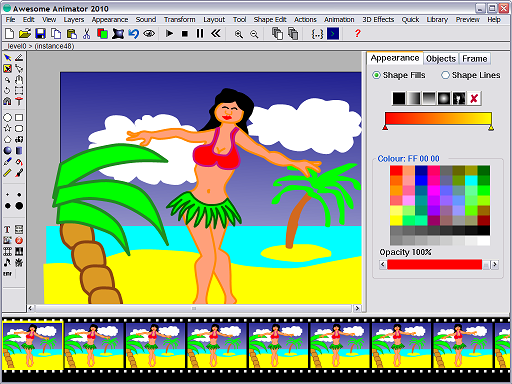
Description: Awesome Animator
(formerly Express Animator) is a software program for making
animations, primarily Flash animations for websites. It is similar to
Adobe's Flash MX software but has additional features such as skeletal
animation and exporting to Silverlight and HTML5 Canvas. The latest
version supports Actionscript 2.0 and 3.0 scripting. It is of the genre
of vector based graphics programs in that it stores the coordinates of
the shapes vertices. The shapes are filled with either colours,
gradients, or bitmaps. The program was re-launched in 2010 as 'Awesome
Animator' with many changes from the original program such as allowing
more complex scripts, an improved renderer and various 'wizards' to
speed up tasks such as creating buttons and charts.
 53. Name: Krita
Operating system: Unix-like system, Windows, OS X
Description: Krita
is a professional FREE and open source painting program. It is made by
artists that want to see affordable art tools for everyone. With Krita,
you can create concept art, texture and matte paintings and
illustrations and comics.
 54. Name: Stykz
Operating system: Linux, Windows, OS X
Description: Stykz
is freeware, meaning it's completely free to download and use to create
animations that you can show off to others or import into other
applications. No hidden costs, license or permission are required to use
Stykz to its fullest. If you've ever used Pivot StickFigure Animator,
you'll feel right at home working with Stykz. Stykz is the first
multi-platform stick figure animation program in the world (as far as we
know), so you'll be able to use Mac OS X, Windows, and Linux* to
create, edit and preview your animations. (*Linux is in internal beta
but will be available soon.)
 55. Name: Adobe Character Animator
Operating system: Linux, Windows, OS X
Description: Adobe Character Animator
is a desktop application software product that combines live
motion-capture with a multi-track recording system to control layered 2D
puppets drawn in Photoshop or Illustrator. It is automatically
installed with Adobe After Effects since CC 2015 and is also available
as a standalone application, which you can download separately. It is
used to produce both live and non-live animation. Character Animator
imports layered Photoshop & Illustrator documents into puppets which
have behaviors applied to them. The puppets are then placed into a
scene, which can be viewed in the Scene panel and Timeline panel.
Rigging is set up in the Puppet panel, though basic rigging is fully
automatic based on specific layer names like Right Eyebrow and Smile.
Final output of a scene can be exported to a sequence of PNG files and a
WAV file, or any video format supported by Adobe Media Encoder. Live
output can be sent to other applications running on the same machine via
the Syphon protocol (Mac only) or Adobe Mercury Transmit on both Mac
and Windows. Scenes can also be dropped directly into After Effects and
Premiere Pro, using Dynamic Link to avoid rendering.