Coronaviruses are zoonotic, meaning they are transmitted between
animals and people. Detailed investigations found that SARS-CoV was
transmitted from civet cats to humans and MERS-CoV from dromedary camels
to humans. Several known coronaviruses are circulating in animals that
have not yet infected humans.
Common
signs of infection include respiratory symptoms, fever, cough,
shortness of breath and breathing difficulties. In more severe cases,
infection can cause pneumonia, severe acute respiratory syndrome, kidney
failure and even death.
Standard recommendations to prevent infection spread include regular
hand washing, covering mouth and nose when coughing and sneezing,
thoroughly cooking meat and eggs. Avoid close contact with anyone
showing symptoms of respiratory illness such as coughing and sneezing.
Nowadays, people are more and more mobile, yet we all have an even
greater need to stay connected than ever before. One way to save money
while traveling is to use Wifi calling. If you don’t know about this
option, here we have all the details you need.
What is Wifi calling?
Although many people may be unfamiliar with Wifi calling, it has
actually been around for a few years already. Essentially, Wifi calling
allows you to make calls using a Wifi connection (or 4G) instead of
using a regular telephone network.
Many apps also allow you to make calls over Wifi. Since most people
are probably familiar with Skype, perhaps the best way to understand
Wifi calling is to compare it with calls made using this popular app.
Skype allows you to call in two ways: either you can call
Skype-to-Skype using Wifi (which is free), or you can use Skype to call
landlines or mobiles. If you choose the latter method, you have to pay,
but the calls are often considerably cheaper than making calls using a
regular telephone.
Wifi calling is the equivalent of using Skype to make calls in this
second way. Depending on where you call from and where you are calling,
you may still have to pay; the difference is, you can do it directly on
your phone without needing to install or use any extra apps to do it.
It is also a handy option when you can’t connect to a telephone network but can connect to a Wifi network.
Can I use Wifi calling?
Wifi calling is already enabled on most modern smartphones. Apple was
among the pioneers, including it on the iPhone 6 when it was launched
in 2014; all iPhones since then have had the ability pre-loaded. Now,
most Android phones also include the built-in ability to use Wifi
calling – although the details of exactly which phones can use it depend
on which model you have as well as your country and operator.
In which countries can it be activated and which mobile operators offer it?
If you have a Wifi calling-enabled smartphone, you can use it
wherever you can connect to Wifi or 4G. However, not all countries and
not all operators offer the ability to make Wifi calls directly from
your phone. Check out this article for further country-specific information regarding this.
Bear in mind, too, that some countries (including China, Vietnam,
North Korea, and Cuba) block the use of Wifi calling, so if you are
traveling in these countries, you won’t be able to use it, even if you
have a Wifi connection.
FAQ
How do I use Wifi calling on an iPhone?
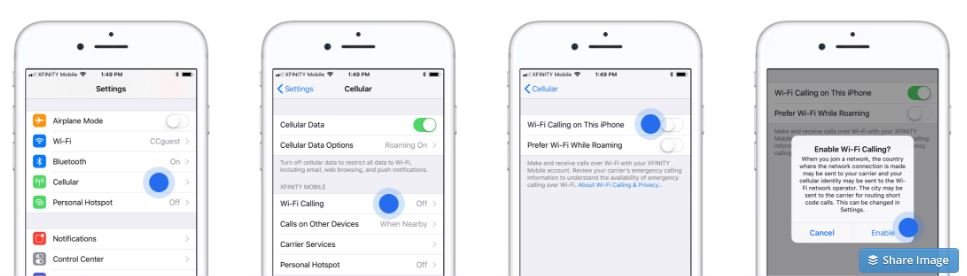
Making calls over Wifi using an iPhone is simple, it’s just a case of activating it in Settings.
Open the “Settings” app and scroll down to “Cellular”.
Click on “Wifi Calling”.
Click the toggle to turn Wifi Calling on. When the query message pops up, click “Enable”.
You can now make calls using Wifi.
How to activate wifi calling on an iPhone
How do I use Wifi calling on the Android?
Enabling Wifi calling on the Android varies depending on the model.
These are the steps for the most recent models, e.g. Galaxy S9. For
older models, the steps may be slightly different but are essentially
the same.
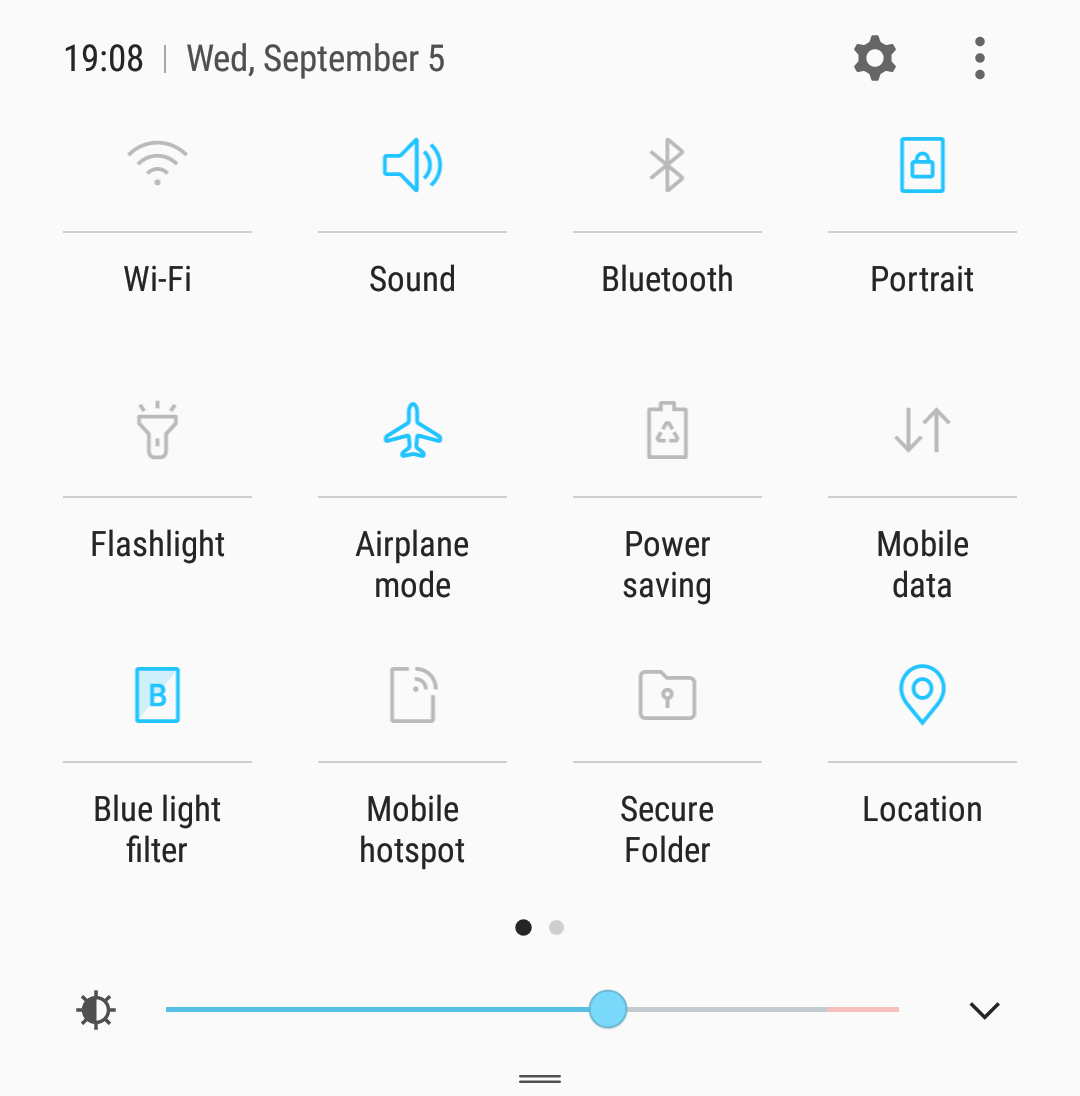
Make sure Wifi is turned on. If it isn’t, go to the Quick Settings panel and turn Wifi on.
Open “Connections” and click “More” for more connection settings.
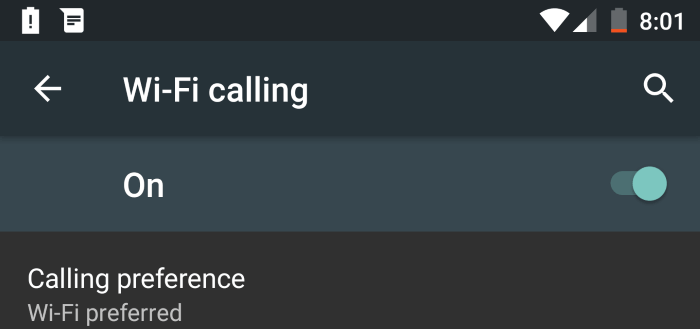
Click on “Wifi calling” and set the toggle to “On”.
Click on “Calling preference”. This allows you to tell your phone
which option to prefer when there is a choice of Wifi or regular phone
networks. The options are to prefer a cellular network, to prefer Wifi,
to only use cellular or to only use Wifi.
How to activate wifi calling on an Android phone
How do I choose preferred voice networks while roaming internationally?
Since Wifi calling uses Wifi and not a regular phone network, you
don’t need to choose a preferred network to make calls – the call will
be made via your home network, not a network in the country where you
are making the call.
Can I send SMS via Wifi calling?
Yes, if Wifi calling is activated, your smartphone will also be able
to send SMS. Details of how to do this may vary depending on the brand
and model of your phone as well as your operator.
Can I make international calls?
Yes, although charges may apply. For example, someone in the US
making a call abroad will be billed for the call. The cost will probably
be similar to making a regular international call, although this will
depend on your operator and your phone contract.
If, for example, a US customer calls a US number (not including
premium) from abroad using Wifi, the call will generally be free. Again,
this will depend on your specific operator and contract.
The details of pricing for international calls vary from country to country and from operator to operator.
Should GPS be turned on to make a call?
Wifi calling does not depend on GPS so there is no need to activate it to make a Wifi call.
Does Wifi calling work in airplane mode?
Wifi calling requires you to be connected to a Wifi network (or 4G). This means you need to deactivate flight mode to use it.
Can I use Wifi calling with Travelers Wifi?
Yes! You can use Travelers Wifi to make free or cheaper calls wherever you go.
How much does it cost?
Costs vary but using this option can be a great way to save money on calls, especially when calling home from abroad.
As an example, for most US users, calling a (non-premium) US number
over Wifi from within the US will be free. The same is true if calling a
US number over Wifi from abroad.
Costs vary from country to country and from operator to operator so
it’s best to check the details before you start using it. Of course, if
you use 4G, it will eat into your data allowance.
Bear in mind that using Wifi calling is certainly not always free. If
you want to be sure to avoid all charges, the safest thing to do is to
use a Skype-to-Skype call over Wifi (or similar with another app like
WhatsApp) to be sure you won’t have to pay.
How much data will a call consume?
Although it varies, a good guideline to remember is that a voice call
will use about 1MB/minute. If you use Wifi calling for video calls, it
will be higher, in the region of 6-8MB/minute.
Stay connected and make calls wherever you travel
Whenever you are away from home, you still need to stay connected on
the go. With our practical portable Wifi solution, you can have
unlimited internet access for Wifi calling or anything else wherever you
travel. Click here for more details.
What are the advantages?
There are several advantages of using Wifi calling, including:
You can call directly from your phone using numbers that you have already saved
You don’t need to download any new apps to do it
It is an excellent way to save money on phone calls while traveling abroad
You can use Wifi calling even when there is no phone signal (as long as there is Wifi)
1. You need good actors. Nothing is better than a good actor performing.
2. For the good actors to perform well, they need a very good script. Hope you have one.
3.
Now comes the film making, and the quality is completely of ypur
choice. If you could spend some money, then get a good camera so that
whatever your actors do gets recorded well.
4. Audio- i have learnt
importance of audio recently, NEVER compromise on the audio. It should
be given as equal importance as the video. To get a feel of it, do watch
your favourite movie without audio, you won't like it.
5. Editing,
to be frank, for a general shortfilm, any software works fine.
Vegas/premiere pro is the best for starting off. But if you need any
special effects to tell your story in a better way, then you might need
after effects. Happy filming :)
Mukesh Ambani-led Reliance Industries just made its entry into the Amazon
and Grofers dominated retail space. Ambani coined the market place as
JioMart which aims to help retailers serve their products to customers
by utilizing Jio‘s
huge digital ecosystem. The Jio Mart operations kicked off as a pilot
project in a few of Mumbai that includes Navi Mumbai, Thane, and Kalyan.
Soon Jio Mart is expected to spread its wings to other parts of the
country. The company aims to connect 3 crore retailers with 20 crore
customers who seem to be online-focussed. Before we go deep into the Jio
Mart and its offerings, let us know what exactly the Jio Mart is.
What is Jio Mart?
JioMart is the e-commerce market place that connects retailers with
customers. Just like Amazon Prime Now and Grofers, Jio Mart will not
maintain any warehouses but will allow local retailers and Kirana
merchants to list their products on the portal and sell them to the
customers. Jio will take care of the operations involved in this process
which include logistics, payments, etc. Jio Mart aims to sell over
50,000 grocery products and will offer benefits that include
Free home delivery on no minimum order value
No questions asked return process
Express delivery promise
In the initial stages, Jio Mart will house products like daily
staples, soaps, shampoos, and other household items which will give
tough competition to players like Amazon and Grofers.
How to Register for Jio Online Grocery Portal and Avail Rs 3000 Worth Benefits?
Jio Mart has made things so simple for both retailers and consumers
by launching a dedicated app and a web portal. Jio Mart will be
available for download for both Android and iOS devices soon. For now,
as the service is available only in Navi Mumbai, Thane, and Kalyan,
users of those areas can visit www.jio.com/jiomart and
preregister to get Rs 3,000 worth of benefits at the time of launch.
Users are required to give these things for the preregistration
Name
E-mail ID
Mobile Number (Any Jio or Non-Jio number)
Type the above details and confirm the mobile number by entering the
OTP. That’s it! You will receive the offer details to your mobile number
and email once the service is launched.
It is reported
that Jio has started registering Kiranas and giving POS machines by
enabling digital payments. The firm is said to assist in getting
loyalty, discount coupons from FMCG firms, which help the retailers get
additional benefits.